



 LinkedIn Profile Made Simple
LinkedIn is a powerful marketing tool for any organization, especially in the B2B industry. B2B marketers perceive it as a great source of high-quality leads, peer interaction, and professional network development.
Table of Contents
- Why a Strong LinkedIn Profile Matters
- Tips on Creating a LinkedIn Profile
- Set Up the Basics: Photo, Banner, and Core Details
- Create a Compelling Headline
- Write an Engaging About/Summary Section
- Optimise Your Experience Section
- Showcase Skills, Expertise, and Accomplishments
- Improve Your Profile with Recommendations
- Optimise Your Profile for Search (LinkedIn SEO)
- Use the Featured Section to Highlight Key Work
- Stay Active: Posting and Engaging on LinkedIn
- Final Checks and Ongoing Optimisation
- Wrap Up
- Next Steps
A strong presence on LinkedIn provides your organization with a professional digital footprint while also allowing your brand to be discovered by millions of LinkedIn users and businesses. Understanding how to construct a LinkedIn profile that effectively represents your brand is critical to achieving visibility.
Creating a LinkedIn Business Page is an important step in increasing your brand’s presence on the platform. This page enables your company to promote its products or services, provide useful industry insights, and attract new customers.
If you’re new to LinkedIn or want to improve your existing profile, this guide will walk you through the stages to creating an appealing profile that stands out and achieves your business objectives.
Why a Strong LinkedIn Profile Matters
When asked what LinkedIn is about, individuals usually respond with words like:
- Personal branding
- Company branding
- Trust-building
- Networking
- Job search
- Lead generation
- Professional networks
This is accurate. LinkedIn is the most trustworthy social network, making it the ideal place for sharing professional material and discovering new opportunities.
Although many people have LinkedIn profiles, not everyone effectively promotes their B2B company or themselves. Professionals use LinkedIn, which is a group you should join if you want to advance your career or expand your B2B business.
Tips on Creating a LinkedIn Profile
Set Up the Basics: Photo, Banner, and Core Details
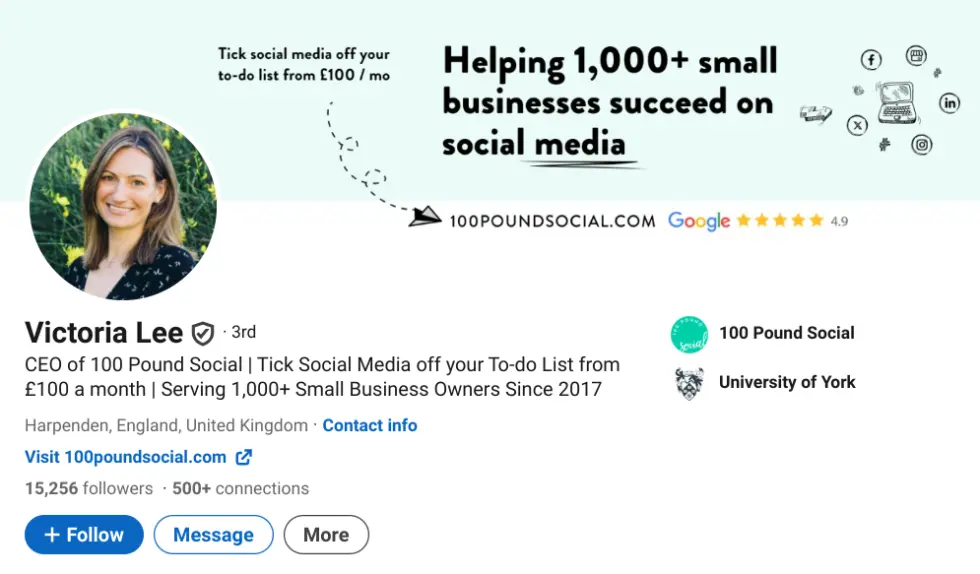
Your LinkedIn profile photo makes a first impression on potential recruiters and contacts. A professionally created, high-quality headshot will greatly enhance the number of views on your LinkedIn profile. When choosing a picture:
Select a clean, high-resolution image.
Dress correctly and use adequate lighting.
Be confident, show your personality, and smile.
When building a profile and learning how to create a LinkedIn profile, be sure you select an email address that you check on a frequent basis. This is necessary for receiving messages, connection requests, and notifications.
Include basic demographic information, such as location. Upload a professionally designed banner to leave a memorable impact.
It is also necessary to supply basic information, such as a phone number. The more ways a potential client can reach you, the better. Allowing LinkedIn access to your email contact list allows you to start creating connections right away.
Create a Compelling Headline
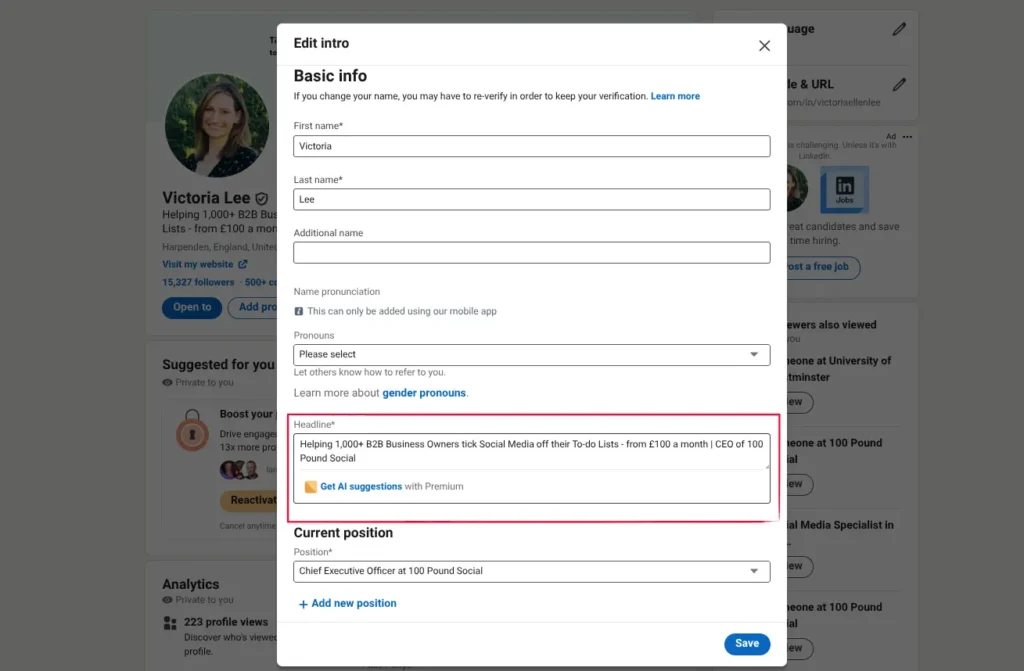
You have 120 characters to create an intriguing headline that explains who you are to your contacts. When you leave a comment on someone else’s post, your headline is typically the only thing they see.
Your headline should be relevant to the position you are seeking. Include:
- Who you are
- What you do
- Who you aspire to be
Create a headline that will attract the type of client you wish to work with. This will encourage them to see your entire profile or connect with you on LinkedIn.
Write an Engaging About/Summary Section
After reading your headline, people may discover more about you by visiting your LinkedIn page. A compelling overview might entice potential clients or partners searching for dependable, capable organizations to collaborate with.
Your summary should
- Share your story
- Showcase your passion for areas of interest
- Outline your objectives
Guidelines to follow:
✅ Write in the first person (use “I” instead of “he” or “she”)
✅ Use phrases that demonstrate your expertise
✅ Include relevant keywords
✅ End with a call-to-action, such as “Email me at [insert email address]” to invite contact
This section should clearly indicate how to contact you and encourage involvement.
Optimise Your Experience Section
Your experience section should include more than just work titles and dates. Include:
- Concise descriptions of your services/products
- Key accomplishments for each role
- Bullet points to improve readability
- Quantified achievements when possible (e.g., “Increased sales by 25% within six months”)
You can also include images or links to showcase your work.
Showcase Skills, Expertise, and Accomplishments
LinkedIn lets you post up to 100 talents. When constructing a LinkedIn profile, include both soft and technical talents relevant to your sector. Put the most important abilities first so they are immediately visible to potential clients.
You can also solicit endorsements from prior or present clients to boost your trustworthiness.
Improve Your Profile with Recommendations
When studying how to develop an effective LinkedIn profile, aim for at least three recommendations to boost your overall credibility.
Recommendations should reflect a wide range of working relationships. They can be requested via LinkedIn’s form, and your contacts will submit the recommendation through their personal account, which you must approve before it displays on your profile.
You can also include media or documents, such as reference letters or portfolio examples, in the Experience or Summary sections.
LinkedIn lets you post up to 100 talents. When constructing a LinkedIn profile, include both soft and technical talents relevant to your sector. Put the most important abilities first so they are immediately visible to potential clients.
You can also include media or documents, such as reference letters or portfolio examples, in the Experience or Summary sections.
Optimise Your Profile for Search (LinkedIn SEO)
If you’re experienced with digital marketing, you’ll understand how important keywords are in SEO. This approach is also applicable to LinkedIn.
To optimise your profile:
- Use terms people are likely to search for when looking for your services or expertise.
- For example, if you are running a digital marketing agency, include phrases like “B2B marketing” or “B2B Social Media Strategy” in your job title. In your description, use relevant phrases such as “Lead Generation” and variations.
- Avoid keyword stuffing; only include terms that are relevant and natural.
To increase visibility, link your LinkedIn profile to your own website, especially if it has domain authority (DA).
Use the Featured Section to Highlight Key Work
The Featured section allows you to showcase:
- Posts
- Newsletters
- Articles
- Links or other media
Use this section to highlight your most relevant skills and accomplishments. Include examples of your work, links, and publications to demonstrate your abilities and knowledge.
Stay Active: Posting and Engaging on LinkedIn
We recommend engaging on LinkedIn at least three times per week. Activities include:
- Posting relevant content
- Liking or commenting on others’ posts
- Writing your own posts
Regular participation allows you to establish relationships with other experts, demonstrate your abilities, and offer views on important topics, fresh ideas, and best practices.
The finest techniques for staying connected on LinkedIn include:
- Keep your profile updated regularly
- Maintain quality connections
- Share content consistently
- Participate in group discussions
- Engage with your connections
Final Checks and Ongoing Optimisation
Don’t leave your profile dormant for long. In addition to producing new content and connecting with connections, it is important to update your profile on a frequent basis.
- New information about your services/products
- Skills you have recently acquired
- Completed projects or achievements
Regular updates signal consistency and growth, which is highly valued by potential partners or clients.
Wrap Up
A LinkedIn profile might be one of the most effective ways to build trust and credibility with your target audience. Google searches for people’s names frequently return LinkedIn profiles near the top of the results, emphasizing the platform’s importance.
Learn how to develop an impressive LinkedIn profile by following these tips and examples. After finishing the basic setup, go over prominent LinkedIn hashtags that you may use in your articles and profile to increase interaction.
Next Steps
To create a successful LinkedIn profile, it’s important to strategically position yourself and highlight your worth. Since 2017, we’ve assisted over 1,000 business owners in developing effective social media strategies for client acquisition.
Our clients frequently report increased turnover, expanding social media followings that lead to business inquiries, and, most crucially, signing new clients as a result of their improved online presence.
Are you ready to change your social media from a time drain to a client-generating asset?
Join a free 15-minute demo to learn how we can develop professional content for your company for just £100 per month. Our holistic approach focuses on attracting clients, creating content that resonates with potential clients, and optimizing performance—everything you need to turn audit findings into long-term business success.





No Comments