Instance dictionaries are used by standard Python objects to store attributes. They are not hashable unless manually implemented, and they default to comparing all attributes. This default behavior is reasonable but not optimal for applications that create a large number of instances or require objects as cache keys.
Data classes overcome these constraints through configuration rather than specific code. You can use parameters to control how instances behave and how much memory they consume. Field-level options also allow you to remove characteristics from comparisons, provide safe defaults for mutable values, and modify how initialization works.
This article focuses on the major data class capabilities that increase efficiency and maintainability while reducing complexity.
1: Frozen Data Classes for Hashability and Safety
Make your data classes immutable to enable hashability. This enables you to utilize instances as dictionary keys or store them in sets, as demonstrated below:
The frozen=True argument makes all fields unchangeable after initialization and automatically uses __hash__(). Without it, you would get a TypeError when attempting to use instances as dictionary keys.
This approach is required for creating caching layers, deduplication logic, or any other data structure that uses hashable types. Immutability also prevents entire kinds of issues in which state changes unexpectedly.
2. Slots for Memory Efficiency
When you instantiate thousands of objects, memory overhead adds up quickly. Here’s an example.
from dataclasses import dataclass
@dataclass(slots=True)
class Measurement:
sensor_id: int
temperature: float
humidity: float
The slots=True argument disables Python’s default per-instance __dict__. Instead of storing attributes in a dictionary, slots employ a more compact fixed-size array.
This small data class saves few bytes per instance and provides faster attribute access. The downside is that you can’t add new properties dynamically.
3. Custom Equality with Field Parameters
Equality checks do not always require participation from all fields. This is especially relevant when dealing with metadata or timestamps, as shown in the example below:
from dataclasses import dataclass, field
from datetime import datetime
from dataclasses import dataclass, field
from datetime import datetime
@dataclass
class User:
user_id: int
email: str
last_login: datetime = field(compare=False)
login_count: int = field(compare=False, default=0)
A field is excluded from the auto-generated __eq__() method when the compare=False argument is set for it.
Two users are deemed equal if they have the same ID and email address, regardless of when they signed in or how many times. This avoids erroneous inequality when comparing items that represent the same logical entity but have distinct tracking metadata.
4. Factory Functions with Default Factory
Using changeable defaults in function signatures is a Python trap. Data classes offer a clean solution:
from dataclasses import dataclass, field
@dataclass
class ShoppingCart:
user_id: int
items: list[str] = field(default_factory=list)
metadata: dict = field(default_factory=dict)
cart1 = ShoppingCart(user_id=1)
cart2 = ShoppingCart(user_id=2)
cart1.items.append(“laptop”)
print(cart2.items)
The default_factory option accepts a callable that returns a fresh default value for each instance. Without it, using items: list = [] would result in a single shared list across all instances, which is the classic mutable default gotcha!
This pattern applies to all changeable types, including lists, dictionaries, and sets. You can also specify custom factory functions for more complicated initialization logic.
5. Post-Initialization Processing
Following the auto-generated __init__, you may need to derive fields or validate data. Here’s how you can do this with post_init hooks:
from dataclasses import dataclass, field
@dataclass
class Rectangle:
width: float
height: float
area: float = field(init=False)
def __post_init__(self):
self.area = self.width * self.height
if self.width <= 0 or self.height <= 0:
raise ValueError(“Dimensions must be positive”)
rect = Rectangle(5.0, 3.0)
print(rect.area)
The __post_init__ procedure is called immediately after the generated __init__ has completed. The init=False argument on area prohibits it from being a __init__ parameter.
This pattern is ideal for calculating fields, applying validation logic, or normalizing input data. You may also use it to change fields or create invariants that are dependent on many fields.
6. Ordering with Order Parameter
Sometimes your data class instances must be sortable. Here’s an example.
from dataclasses import dataclass
@dataclass(order=True)
class Task:
priority: int
name: str
tasks = [
Task(priority=3, name=”Low priority task”),
Task(priority=1, name=”Critical bug fix”),
Task(priority=2, name=”Feature request”)
]
sorted_tasks = sorted(tasks)
for task in sorted_tasks:
print(f”{task.priority}: {task.name}”)
Output:
1: Critical bug fix
2: Feature request
3: Low priority task
The order=True argument creates comparison methods (__lt__, __le__, __gt__, and __ge__) based on field ordering. Fields are compared from left to right, therefore priority takes precedence over name in this case.
This feature allows you to naturally sort collections without having to write any proprietary comparison logic or key functions.
7. Field Ordering and InitVar
When initialization logic necessitates values that should not become instance attributes, use InitVar, as illustrated below:
The InitVar type hint indicates that a parameter is supplied to __init__ and __post_init__ but does not become a field. This keeps your instance clean while allowing for complicated initialization logic. The ssl flag effects how we construct the connection string but does not need to be maintained thereafter.
When Not to Use Data Classes
Data classes are not always the appropriate tool. Avoid using data classes when:
You require extensive inheritance structures with specific __init__ logic at various levels.
You are creating classes with significant behavior and methods (use ordinary classes for domain objects).
You require validation, serialization, or parsing functionality, which libraries like Pydantic or attrs provide.
You’re working with classes with complex state management or lifecycle needs.
Data classes are best used as lightweight data containers rather than full-featured domain objects.
Conclusion
Writing efficient data classes requires knowing how their options interact, rather than memorizing them all. Knowing when and why to use each feature is more important than remembering all of the parameters.
As explained in the article, features such as immutability, slots, field customization, and post-init hooks enable you to create Python objects that are lean, predictable, and safe. These patterns help to minimize problems and reduce memory overhead without increasing complexity.
With these approaches, data classes enable you to write code that is clear, efficient, and maintainable. Happy coding!




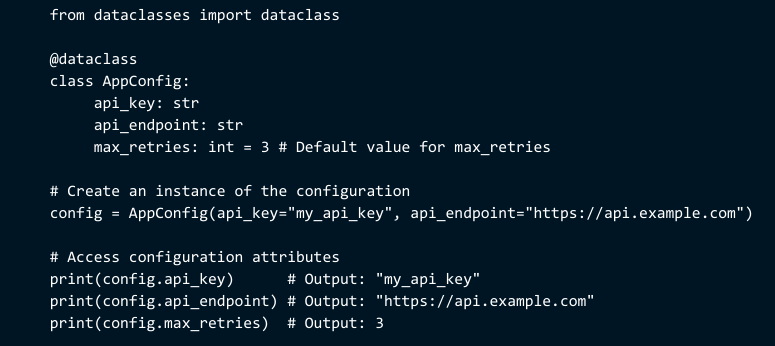 Write Efficient Python Data Classes







No Comments